How to Track Employee Attendance: Steps, Tools & Examples

Key Takeaways
- The fastest way to track employee attendance accurately is to pair a digital clock-in method (mobile, biometric, or GPS) with software that syncs directly to payroll and leave records, instead of relying on spreadsheets or paper logs.
- Manual attendance tracking is the single biggest source of payroll errors for growing teams. Switching to automated systems can cut payroll errors by up to 60%, according to one analysis of manual payroll processing.
- A good attendance tracking process has five parts: a written policy, a chosen tracking method, employee adoption, regular reporting, and a direct link to payroll.
- brioHR combines time and attendance, leave, and timesheets in one system, so a clock-in automatically updates leave balances and payroll, with no manual reconciliation.
Introduction
Someone forgets to clock out on a Friday. A manager approves a timesheet without checking it against the leave calendar. Payroll runs with three hours of unpaid overtime baked in, and nobody notices until an employee asks why their pay looks short.
None of these mistakes happen because anyone is careless. They happen because the systems tracking attendance, leave, and pay don't talk to each other.
Tracking employee attendance well means capturing when people work, reconciling that against approved leave, and feeding clean data into payroll, without someone manually checking three different spreadsheets every pay cycle. This guide covers the different ways to track attendance, a five-step process for setting it up properly, a checklist for HR teams, and the mistakes that cause the most payroll disputes.
Different Ways to Track Employee Attendance
Most companies land on one of five tracking methods. The right choice depends on headcount, how distributed the team is, and how much manual work HR can absorb each month. Attendance data also feeds into broader employee engagement tracking, since patterns in lateness or absence are often an early engagement signal. Paper timesheets and manual logs still show up often. One industry dataset found that 38% of US employees who track time use manual systems like punch cards and paper logs. They're cheap to start, but every entry has to be typed into payroll by hand, which is where errors creep in.
Spreadsheets are a step up. They're searchable and easier to total, but someone still has to manually enter every clock-in and manually cross-check it against approved leave.
Biometric devices (fingerprint or facial recognition scanners) solve the buddy punching problem, where one employee clocks in for another. The American Payroll Association estimates that over 75% of companies lose money to time theft in some form. Biometric hardware fixes identity verification but usually needs a fixed location and upfront device cost.
Mobile and GPS-based tracking lets employees clock in from their phone, with geofencing to confirm they're actually on-site. This fits distributed teams, field staff, and multi-location retail or F&B operations well.
Digital attendance software (like brioHR's time and attendance module) combines mobile clock-in, GPS, and biometric integration in one system that also feeds leave balances and payroll automatically.
| Method | How It Works | Pros | Cons | Best For |
|---|---|---|---|---|
| Paper timesheets | Employees write hours manually | No setup cost | High error rate, slow to process | Very small teams, under 10 people |
| Spreadsheets | Manual entry into shared files | Low cost, searchable | Still manual, no payroll sync | Small teams still formalizing process |
| Biometric devices | Fingerprint or facial scan at a fixed point | Stops buddy punching | Needs hardware, fixed location only | On-site teams, factories, warehouses |
| Mobile/GPS tracking | Clock-in via app with location check | Works for remote or field staff | Needs reliable phone access | Distributed or multi-location teams |
| Digital attendance software | Clock-in syncs to leave and payroll automatically | Fewer errors, less admin, scalable | Requires rollout and adoption | Growing SMEs and mid-market companies |
Pro Tip: If your team is still using spreadsheets but growing past 30-50 employees, that's usually the point where manual reconciliation starts eating more HR time than the software switch would cost.
How to Track Employee Attendance Step by Step
Picking a tracking method is only the first decision. Here's the process that turns "we have a tool" into "attendance data is actually reliable."
Step 1: Write a Clear Attendance Policy
Before choosing any tool, define what counts as late, what the grace period is, how overtime gets approved, and how exceptions (like client visits or field work) get logged. Without this written down, every manager will apply their own judgment, and your attendance data won't be consistent enough to trust for payroll or performance decisions.
Keep the policy short enough that employees actually read it, and store it somewhere accessible, like a digital employee file that every staff member can reference.
Step 2: Choose a Tracking Method That Matches Your Team
Use the comparison table above to match your tracking method to your team's structure. A single-location office team has very different needs from a retail chain with staff across multiple outlets, a hotel running round-the-clock shifts, or a manufacturing floor with rotating shift patterns.
Step 3: Roll It Out and Get Employees to Actually Use It
A tracking system only works if people clock in correctly every day. Communicate the change before launch, run a short training session, and designate someone (usually a line manager) to flag missed clock-ins in the first two weeks rather than letting them pile up.
Did You Know: Employers that rely on manual systems report that roughly 40% of productivity loss from unplanned absence goes untracked until it shows up in missed deadlines, not in the attendance log itself. Catching it earlier starts with consistent daily data.
Step 4: Set Up Regular Attendance Reporting
Weekly or biweekly reports, not just a monthly summary, let managers catch patterns (chronic lateness, unapproved overtime, leave taken without approval) while they're still small problems. brioHR's reporting and analytics tools build these views automatically, with scheduled emails so managers don't have to remember to pull the data themselves.
Step 5: Connect Attendance Data Directly to Payroll
This is the step most companies skip, and it's the one that causes the most disputes. If attendance data has to be manually re-entered into a separate payroll system, you've reintroduced the exact error risk you were trying to remove. Attendance, leave, and payroll need to share the same employee record, so an approved leave day automatically excludes that day from attendance flags, and logged overtime flows straight into the next pay run.
Employee Attendance Tracking Checklist for HR Teams
Use this as a working checklist when setting up or auditing your attendance process:
- Policy documented: Late, overtime, and exception rules are written down and accessible to every employee.
- Tracking method matches team structure: Field staff, shift workers, and office staff aren't forced into the same method if it doesn't fit.
- Clock-in method verified: Biometric, GPS, or mobile check-ins actually confirm the right person, at the right place.
- Leave sync confirmed: Approved leave automatically removes that day from attendance alerts, no manual cross-checking needed.
- Manager review cadence set: Someone checks attendance reports weekly, not just at month-end.
- Payroll link tested: Run one full cycle and confirm hours worked, overtime, and leave deductions land correctly in payroll without manual adjustment.
- Audit trail available: Every clock-in, edit, and approval is timestamped and traceable, useful for disputes and compliance checks.
Common Mistake: HR teams often set up the tracking tool correctly but skip testing the payroll sync before go-live. The first full pay cycle is where sync errors surface, so test it with a small group before rolling out to the full company.
brioHR's leave and time-off module handles the leave side of this checklist natively, which removes the most common gap: leave approved in one system but not reflected in attendance records.
Manual vs. Automated Attendance Tracking
The gap between manual and automated tracking isn't just convenience. It shows up directly in payroll accuracy and HR hours spent on admin.
| Factor | Manual Tracking | Automated Tracking |
|---|---|---|
| Data entry | Typed in by hand each cycle | Captured automatically at clock-in |
| Error rate | Higher, since every entry is manually transcribed | Lower, automated systems can reduce payroll errors by up to 60% |
| Leave reconciliation | Manual cross-check against separate leave records | Automatic, same employee record |
| Reporting | Pulled together manually, often monthly | Scheduled and real-time |
| Buddy punching risk | High, no identity verification | Low with biometric or GPS options |
| HR time per pay cycle | Hours of manual reconciliation | Minutes to review flagged exceptions |
Time theft adds up faster than most HR teams expect.Buddy punching alone is estimated to cost US employers 2.2% of gross payroll where it goes unchecked. For a company running RM 500,000 in monthly payroll, that's roughly RM 11,000 a month in hours paid for time that was never worked.
"HRMS is the only software that 100% of employees use in the company... everyone applies for leave, everyone clocks in, clocks out."
That's the practical case for automating attendance before anything else: it's the one dataset every employee touches daily, so errors in it compound across the entire company, not just one department.
Employee Attendance Tracking Best Practices
Beyond the setup checklist, a few ongoing habits keep attendance data reliable as the company grows.
Review Absence Patterns, Not Just Totals
A single absence rarely tells you anything. A pattern of Monday or Friday absences, or absences clustered around the same manager, is worth investigating. Pair attendance data with your absenteeism tracking process rather than treating them as separate systems.
Make Exceptions Easy to Log, Not Easy to Ignore
Field visits, client meetings, and approved remote days should have a quick logging path, not a workaround that skips the system entirely. If exceptions are hard to log properly, employees will stop logging them accurately, and your data quality drops.
Tie Attendance Data Into Performance Conversations Carefully
Attendance patterns can be a useful input into performance management conversations, but they shouldn't be the only data point. Use them as a prompt for a conversation, not as an automatic judgment.
Audit the Payroll Link Every Quarter
Systems drift. New pay rules, new shift patterns, or a new public holiday calendar can quietly break the sync between attendance and payroll. A short quarterly check, running one pay cycle manually alongside the automated one and comparing totals, catches this before it becomes a dispute.
Using brioHR for Tracking and Attendance Management
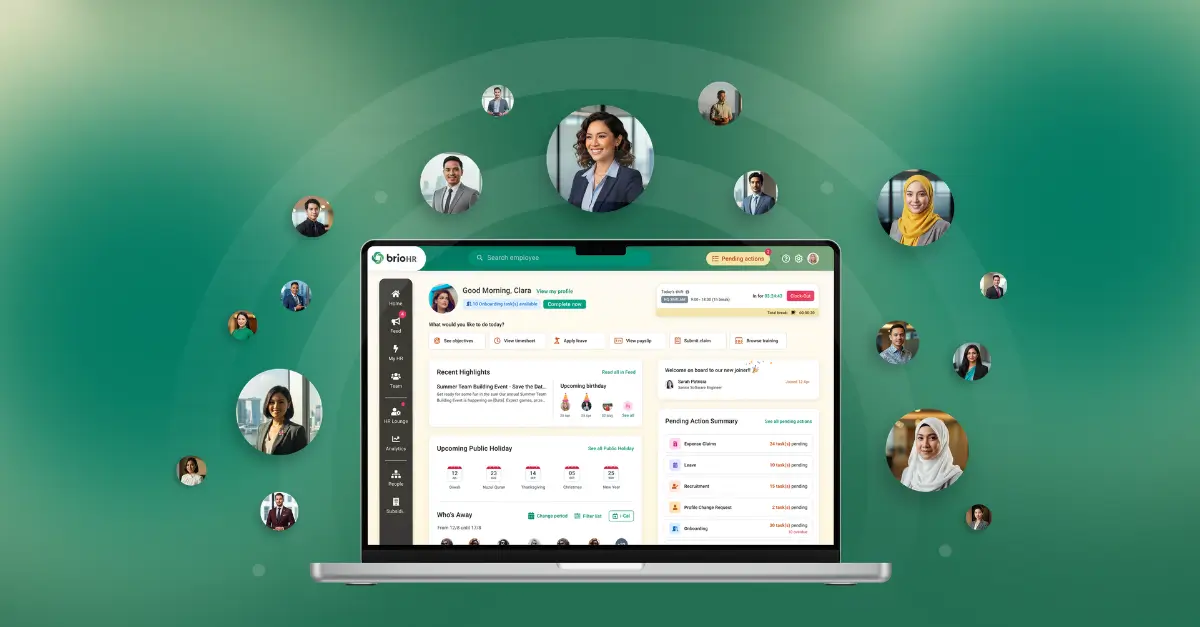
brioHR is an all-in-one HRMS covering the full employee lifecycle. Attendance sits at the center of three connected modules: time and attendance, leave and time-off, and timesheets. More than 1,000 organizations across 50 countries run their HR operations on brioHR, including multi-location retail teams managing shift-based attendance across outlets.
What Is brioHR Best For
brioHR is best for growing SMEs and mid-market companies in Malaysia and Singapore (roughly 30 to 3,000 employees) that need attendance, leave, and payroll to work as one connected system instead of three separate tools that require manual reconciliation.
Key Features
- Time and attendance: Mobile clock-in with GPS and geofencing, biometric integration, shift scheduling, rotating shift support, and automatic overtime calculation.
- Leave and time-off: Multi-level approval, accrual rules, carry-forward and expiry handling, custom leave types, and automatic sync with attendance records.
- Timesheets: Manual entry for employees who need it, with built-in approval flows that connect straight to payroll runs.
Automatic Payroll Sync
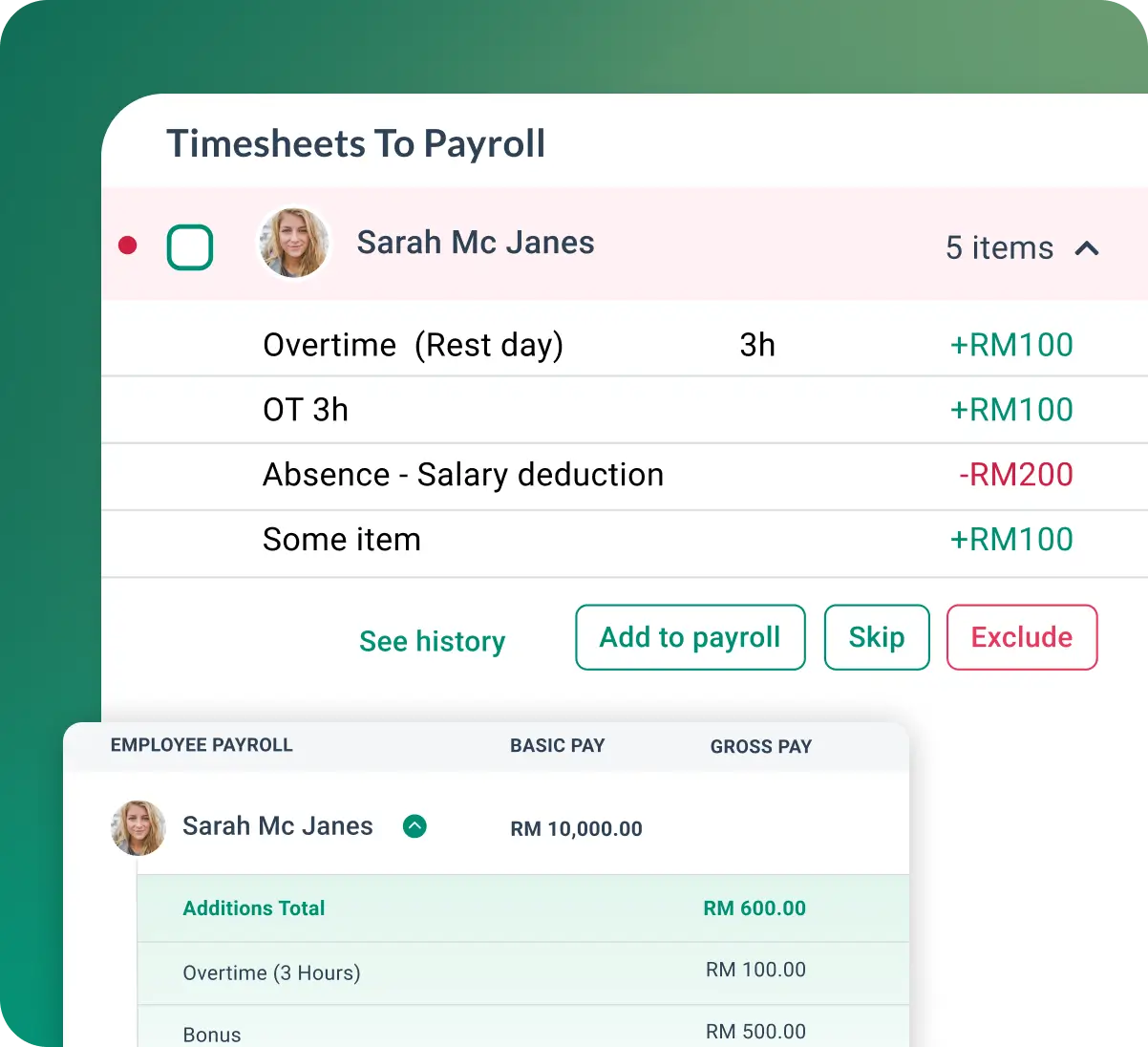
The standout feature for attendance specifically is how clock-in data flows into payroll without a manual export-import step. Hours worked, approved overtime, and leave deductions calculate automatically each pay cycle, which is the exact gap most manual or spreadsheet-based systems leave open.
Geofenced Mobile Clock-In
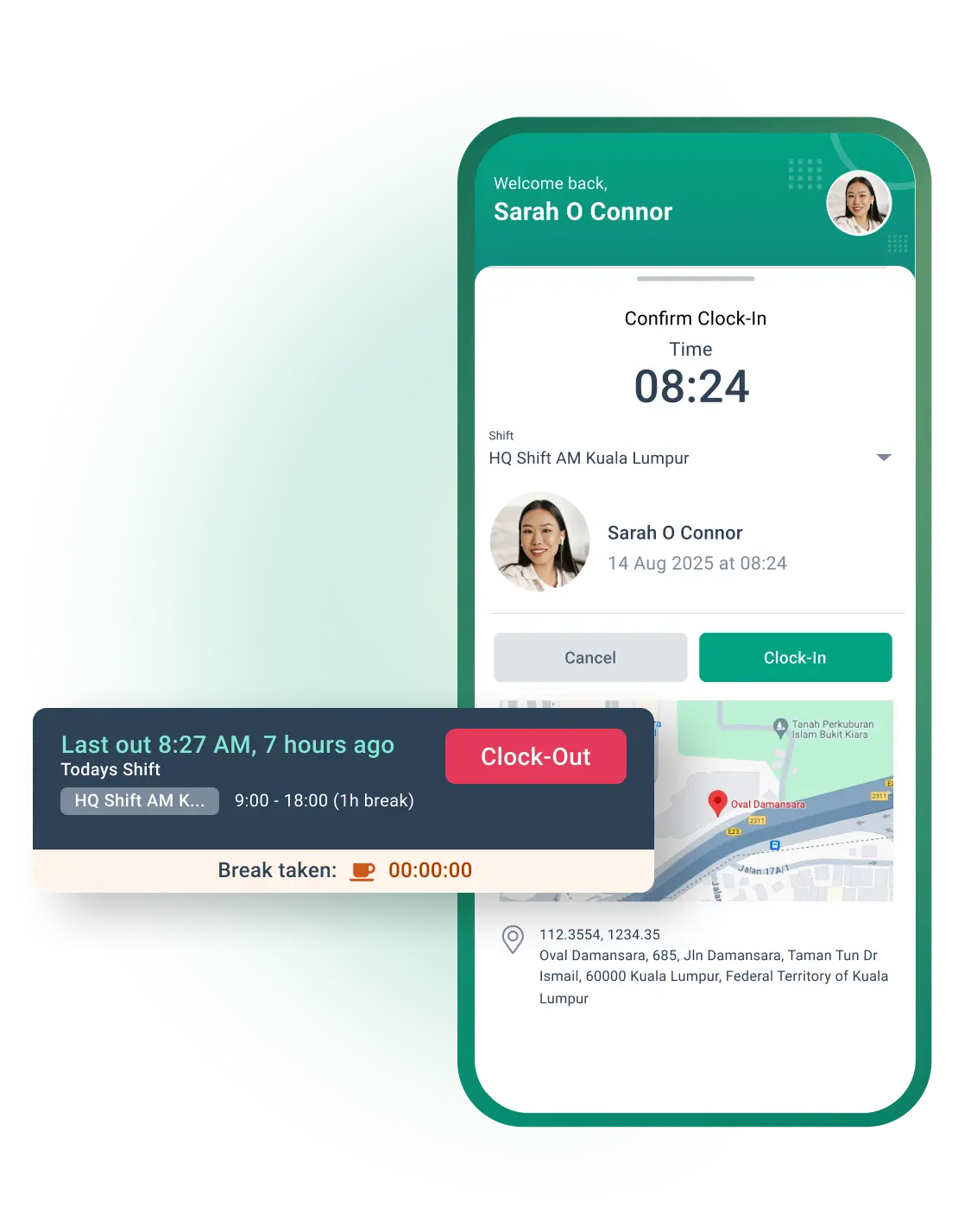
For teams with multiple locations, retail outlets, warehouses, or field staff, geofencing confirms an employee is actually on-site when they clock in, without needing a fixed biometric device at every location.
Real-Time Attendance Reporting
Managers get live dashboards and scheduled report emails instead of pulling together a manual summary at month-end, which is what makes the weekly review habit in the best-practices section above realistic to maintain.
Pricing
| Plan | Details |
|---|---|
| Time & Attendance module | Modular pricing from RM3 per employee per month, based on company size |
| Bundled with payroll and leave | Discounted when combined as part of brioHR's full HRMS suite |
| Custom quote | Tailored based on headcount, number of locations, and shift complexity |
Where brioHR Shines
- One employee record across attendance, leave, and payroll: No manual reconciliation between systems.
- Built for Malaysia and Singapore compliance: EPF, SOCSO, EIS, CPF, and SDL calculations factor in attendance and leave data automatically.
- Sub-three-minute support response times, with a 96% positive feedback rate, which matters most during a pay cycle that's gone wrong.
Where brioHR Falls Short
- Geofenced tracking depends on employee phone access: Teams without company-issued devices need employees to use personal phones, which some workplaces prefer to avoid.
- Full value takes a connected rollout: Companies that only adopt the attendance module without linking leave and payroll won't see the full reduction in manual reconciliation work.
brioHR Customer Reviews


Make attendance and payroll work together
Automate clock-ins, overtime tracking and payroll handoffs across your team.
Common Attendance Tracking Mistakes to Avoid
| Mistake | Why It Happens | The Fix |
|---|---|---|
| No written attendance policy | Rules exist only in managers' heads | Document late, overtime, and exception rules once, store them centrally |
| Relying on spreadsheets past 50 employees | Nobody revisits the process as the team grows | Reassess tracking method at each major headcount milestone |
| Leave and attendance tracked separately | Leave approvals live in a different system or inbox | Use one connected system so approved leave updates attendance automatically |
| No payroll sync testing before go-live | Teams assume the sync "just works" | Run one full pay cycle manually alongside the new system before fully switching |
| Ignoring attendance patterns until payroll disputes happen | Reports are pulled only at month-end | Set a weekly or biweekly manager review cadence |
| No audit trail for edits | Basic tools don't log who changed what | Choose a system with timestamped audit logs for every attendance edit |
Why Payroll Errors Matter
Benjamin Croc frames the cost of getting this wrong from a leadership perspective:
"As a CEO, I will not clap every time employees get their salaries. It's normal. But if there is a payroll error, big trouble for everyone, right?"
Attendance tracking mistakes rarely show up as attendance problems. They show up as payroll problems, which is why fixing the attendance process is usually the highest-leverage payroll fix available.
What Successful Attendance Tracking Looks Like In Practice
Companies that get this right usually share one trait: attendance, leave, and payroll live in the same system, so HR spends review time on exceptions instead of reconciliation.
SRKK, a technology solutions provider, moved its HR operations onto brioHR as part of a broader push to reduce manual admin work across the business. You can read the full SRKK case study for details on how that rollout worked.
iDynamics chose brioHR specifically to build more reliable systems across its HR operations, including attendance and payroll data that previously required manual checking. The iDynamics case study covers the full rollout.
TFD Collective, operating in Singapore's events industry where shift patterns change constantly, used brioHR to standardize HR processes across a workforce with irregular hours. See the TFD Collective case study for more on how that played out.
The pattern across all three: the switch wasn't about adding a feature, it was about removing the manual reconciliation step between attendance, leave, and pay.
Manage Employee Attendance Tracking With brioHR
Attendance tracking only earns its keep when it removes work from HR's plate instead of adding a new tool to check. brioHR connects time and attendance, leave, and payroll in one employee record, so the five-step process in this guide becomes mostly automatic after the initial setup.
See how it fits your team's shift patterns and headcount with a personalized demo, explore the full platform on the brioHR homepage, or start with brioHR's onboarding module to see how attendance setup connects to a new hire's first week. If payroll accuracy is the bigger concern, our guide to automated payroll software covers that side in more depth.
Everything HR.
One login
From payroll to onboarding, brioHR gives you everything you need in one place. Built for busy teams. Backed by people who care.