How to Do Payroll: A Step-by-Step Guide for HR Teams in 2026

Key Takeaways
- Payroll has five core steps: gathering employee data, calculating gross pay, applying deductions, disbursing payments, and filing statutory reports. In Malaysia, salary is due by the 7th of the following month, and EPF, SOCSO, EIS, PCB, and HRD Corp payments by the 15th.
- Manual payroll works for very small teams, but the time cost and error risk climb fast once you pass a handful of employees or add shift differentials, bonuses, or multiple entities.
- Most small businesses underestimate the admin load: owners typically spend 5 to 8 hours per pay period on payroll processing alone.
- Automated payroll software like brioHR cuts that time down by syncing attendance, leave, and claims data directly into each pay run instead of re-entering it by hand.
Payroll sounds simple until you're the one running it. You collect hours, work out gross pay, subtract the right deductions, send the money, then file the paperwork before a deadline that doesn't move.
Each step carries its own rules. Miss one and the next person who notices is usually an employee asking why their pay looks short, or a statutory body asking why a filing is late.
This guide walks through how to do payroll step by step, the mistakes that trip up HR teams most often, and when it's worth moving from spreadsheets to dedicated payroll software. Whether you're setting up payroll for the first time, trying to tighten an existing process, or weighing manual payroll against automated software, the steps below apply whether you have five employees or five hundred.
Payroll Process: Step-by-Step Guide for HR Teams
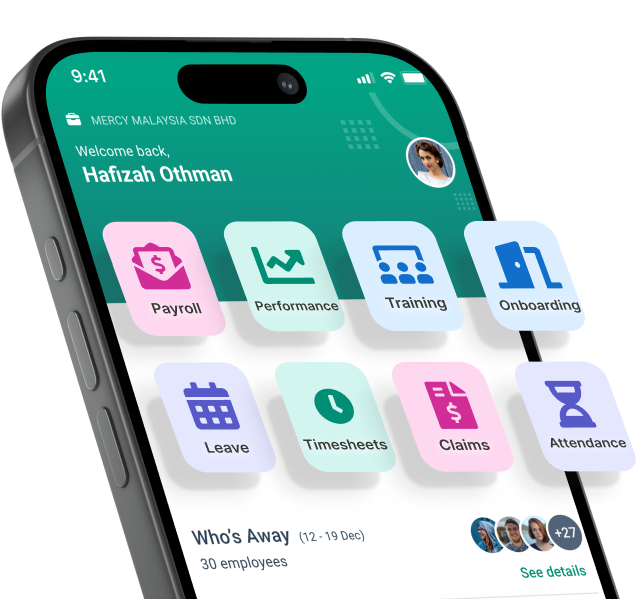
Running payroll the same way every cycle is what keeps it boring, in the good sense. Here's the process broken into five steps, shown the way it works inside brioHR.
Step 1: Collect and Verify Employee Data
Before you calculate a single ringgit or dollar, you need accurate, current data for every employee on the payroll: base salary, bank details, tax identification numbers, statutory contribution numbers (EPF, SOCSO, CPF, depending on your market), and any recurring allowances.
New joiners need this set up before their first pay run. Anyone who changed bank accounts, got a raise, or switched from part-time to full-time needs their record updated before the cycle closes, not after.
In brioHR, employee data entered during onboarding carries straight through to payroll, so there's no separate data entry step for new hires. If a detail changes mid-month, like a bank account update, it updates the payroll record automatically rather than needing a manual edit in a second system.
A single incorrect bank account number can delay a payment for days while the funds bounce back and get reprocessed. A missing statutory number can block a filing entirely until it's corrected. Building a short checklist of required fields, and confirming each one is filled in before a new hire's first pay cycle, avoids both problems.
In Malaysia, that checklist covers four statutory items plus employment type:
| What to collect | Format or example | Why payroll needs it |
|---|---|---|
| EPF number | 8 digits, e.g. 19493164 (same format for Malaysians and foreigners) | Monthly EPF contribution submission |
| Income tax number (TIN) | “IG” followed by 10 or 11 digits, e.g. IG12345678901 | PCB remittance and the year-end EA Form. Employees without one register via e-Daftar on the MyTax portal |
| SOCSO and EIS number | Malaysians: IC number, e.g. 890101-43-1919. Foreign workers: 12-digit SSFW number, e.g. 201900872938 | SOCSO and EIS share one identifier |
| Forms TP1 and TP3 | TP1 completed by the employee; TP3 issued by the previous employer (mid-year joiners only) | TP1 lets PCB reflect the employee’s reliefs and rebates. TP3 carries year-to-date income and PCB into your calculation; fresh graduates skip it |
| Employment type | Full-time, part-time (30% to 70% of normal hours), fixed-term, or other (freelance, intern, contractor) | Sets the pay structure and statutory treatment |
Step 2: Calculate Gross Pay
Gross pay is base salary plus everything added on top: overtime, shift allowances, commissions, and bonuses. For hourly or shift-based staff, this step depends entirely on accurate time and attendance records.
This is where manual payroll tends to break down first. If attendance is tracked in one spreadsheet and payroll calculated in another, someone has to reconcile the two by hand every cycle, and that's exactly where overtime errors creep in.
brioHR pulls clock-in data, approved overtime, and leave balances directly from its time and attendance module into the payroll calculation, so gross pay reflects what actually happened that period, not what was projected at the start of it.
For employees who joined or left mid-cycle, gross pay also needs to be prorated correctly, a calculation that's easy to get wrong manually. See our guide to prorated salary calculation for the formula.
Commission and bonus structures add another layer. If sales commissions are calculated in a separate system, or bonuses are approved through email threads rather than a tracked workflow, there's no single source of truth for what should be included in that cycle's gross pay. Keeping these approvals inside the same platform that runs payroll removes the step where a bonus gets forgotten or double-counted.
Which pay components attract which deductions (Malaysia)
Not every ringgit of gross pay is treated the same way. Tag each component correctly at this stage, because Step 3 applies EPF, SOCSO, EIS, and PCB to different parts of it.
| Pay component | EPF | SOCSO and EIS | PCB (income tax) |
|---|---|---|---|
| Basic salary | Yes | Yes | Yes |
| Overtime | No | Yes | Yes |
| Commission | Yes | Yes | Yes |
| Bonus | Yes | No (annual bonus) | Yes |
| Allowances | Yes | Yes | Yes |
| Leave encashment | Yes | Yes | Yes |
| Service charge (tips) | No | Yes | Yes |
| Termination benefits | No | No | Yes (exemptions may apply) |
Step 3: Apply Deductions and Statutory Contributions
Once gross pay is set, you subtract the required deductions: income tax withholding, statutory retirement contributions, social security contributions, and any voluntary deductions like loan repayments or insurance premiums.
In Malaysia, that means EPF, SOCSO, EIS, and PCB (Monthly Tax Deduction). In Singapore, it's CPF, SDL, and the relevant IR8A or IR21 filings depending on employment status, and employees who join or leave partway through the month also need their incomplete month salary calculated correctly before deductions are applied. Rates and caps change periodically, and running payroll on outdated tables is one of the fastest ways to end up with an underpaid statutory contribution.
Malaysia's statutory contribution rates at a glance
EPF sorts employees into five categories under the Third Schedule of the EPF Act 1991. Most Malaysian workforces only touch three: Category A for local staff under 60, B for foreign workers, and E for Malaysians aged 60 and above. Confirm current rates on the EPF website before each year's first pay run.
| EPF category | Who it covers | Employer | Employee |
|---|---|---|---|
| A | Malaysians, PRs, and non-Malaysians contributing before 1 Aug 1998; under 60; wages up to RM5,000 | 13% | 11% |
| A | Same group, wages above RM5,000 | 12% | 11% |
| B | Non-Malaysians registered from 1 Aug 1998; under 60 | 2% | 2% |
| C | PRs and non-Malaysians contributing before 1 Aug 1998; 60 and above; wages up to RM5,000 | 6.5% | 5.5% |
| C | Same group, wages above RM5,000 | 6% | 5.5% |
| D | Non-Malaysians registered from 1 Aug 1998; 60 and above | 2% | 2% |
| E | Malaysians aged 60 and above | 4% | 0% |
SOCSO and EIS are both run by PERKESO, and both are calculated on wages up to an assumed ceiling of RM6,000 a month.
| Scheme | Who it covers | Employer | Employee |
|---|---|---|---|
| SOCSO, First Category | Under 60, including expatriates and foreign workers registered with SOCSO (Employment Injury and Invalidity schemes) | 1.75% | 0.5% |
| SOCSO, Second Category | Aged 60 and above, or first hired after 55 (Employment Injury Scheme only) | 1.25% | 0% |
| EIS | Employees aged 18 to 60 | 0.2% | 0.2% |
How PCB is calculated
PCB (Potongan Cukai Bulanan) is the income tax an employer withholds each month and remits to LHDN. The LHDN-prescribed formula spreads the employee's projected annual tax across the months left in the year:
P is total chargeable income for the year: projected earnings minus EPF and the reliefs the employee declared on Form TP1. M, R, and B come from LHDN's tax band table (the lower bound of the employee's band, its tax rate, and the tax on M after rebates). Z is zakat already paid this year, X is PCB already deducted this year (including by a previous employer, via Form TP3), and n + 1 is the number of months remaining, counting the current one.
Because P is re-projected every month, a bonus, a new TP1 claim, or a salary change all shift the deduction. Zakat deducted through payroll counts as a tax rebate and must appear on both the payslip and the EA Form. Employers without payroll software can use LHDN's e-CP39 platform instead. For the full worked breakdown, including the tax band table, see our Malaysia Payroll Guide.
brioHR's payroll engine updates its statutory tables automatically when rates change, so HR teams aren't manually tracking rate changes across two or more jurisdictions.
Step 4: Disburse Payments
With gross pay calculated and deductions applied, the next step is getting net pay into employees' bank accounts on time, along with a payslip that itemizes exactly how the figure was reached.
Late payroll, even by a day, damages trust fast, and employees rarely give HR the benefit of the doubt on it twice.
brioHR supports direct bank disbursement and auto-generates itemized payslips for every employee once a pay run is approved, with support for multiple pay frequencies if your company runs weekly wages alongside monthly salaried staff.
Malaysia payment deadlines & channels
In Malaysia, the monthly calendar runs on two dates: salary by the 7th of the following month, and every statutory payment by the 15th. brioHR generates the contribution files you upload to each portal, so the 15th becomes one batch of uploads rather than five separate calculations.
| Payment | Deadline | Payment channels |
|---|---|---|
| Salary | 7th of the following month | Direct transfer, cheque |
| EPF (KWSP) | 15th of the following month | i-Akaun (employer), Mobile App, Online Banking, Bank Agents, any EPF branch |
| SOCSO & EIS (PERKESO) | 15th of the following month | PERKESO ASSIST Portal (FPX), Direct Debit Authorisation (DDA), Bank Agents, Online Banking, Prihatin App |
| Income Tax / PCB | 15th of the following month | ByrHASIL (FPX), Online Banking, Service Counter Agents (participating banks and post offices), Cash Deposit Machine, ATM |
| HRD Corp levy (registered employers) | 15th of the following month | Manual payment (participating banks), JomPAY, e-Tris Portal Online (FPX) |
Step 5: File Statutory Reports and Keep Records
The pay run isn't finished once money lands in accounts. Most jurisdictions require periodic statutory filings, EPF and SOCSO contribution submissions in Malaysia, CPF submissions in Singapore, along with annual forms like Malaysia's EA Form or Singapore's IR8A.
Records also need to be retained for a set number of years in case of audit, which means your payroll system needs a reliable archive, not just a folder of PDFs someone remembers to back up.
brioHR generates the required statutory reports in the formats needed for e-filing and keeps a full audit trail of every pay run, so records are retrievable years later without digging through old spreadsheets.
Year-end filings bring their own deadlines on top of the monthly cycle, Malaysia's EA Form (CP8A) and E Form, for example, or Singapore's IR8A and IR21 for departing or foreign
employees. Building these into the same calendar as monthly statutory submissions means nothing gets left until the week before the deadline.
In Malaysia, the PCB you deduct every month feeds two year-end filings:
| Filing | What it is | Deadline |
|---|---|---|
| EA Form (CP8A) | Each employee’s annual summary of pay, benefits, and statutory deductions, issued by the employer to the employee | End of February, for the previous year’s income |
| E Form (with CP8D) | The employer’s annual return to LHDN reporting all employees’ earnings and tax, with CP8D listing each employee | 31 March |
Best Practices to Make Payroll Processing More Efficient
Running payroll correctly is the baseline. These five practices are what separate teams that dread each cycle from teams that barely notice it happening.
Set a Fixed Payroll Calendar
The problem: Ad hoc payroll timing means approvals, data collection, and bank cutoffs all compete for attention at the last minute.
Why it matters: A fixed calendar, with clear deadlines for timesheet submission, manager approval, and final payroll lock, removes the guesswork every cycle and gives you a buffer if something needs correcting.
How to implement it: Publish the calendar at the start of the year, anchored to your statutory dates (in Malaysia, the 7th for salary and the 15th for contributions), and set automated reminders a few days before each cutoff. In brioHR, you can configure recurring pay cycle dates once and let the system handle the reminders.
Automate Time and Attendance Capture
The problem: Manually transferring hours from timesheets into payroll is slow and introduces transcription errors.
Why it matters: Every manual data transfer is a chance for a number to get copied wrong, and errors compound when overtime or shift premiums are involved.
How to implement it: Connect attendance tracking directly to payroll so approved hours flow through without re-entry. See our guide on shift management software if your team works rotating or split shifts.
Reconcile Before Every Run, Not After
The problem: Teams often catch payroll errors only after employees flag a short or overpaid paycheck.
Why it matters: Post-payment corrections mean clawing back overpayments or issuing off-cycle top-ups, both of which are more disruptive than catching the issue beforehand.
How to implement it: Build a short reconciliation checklist covering new joiners, leavers, salary changes, and leave without pay, and review it against the draft pay run before approving disbursement.
Keep Statutory Tables Current
The problem: EPF, SOCSO, CPF, and tax rates change periodically, and manual spreadsheets don't update themselves.
Why it matters: Submitting contributions at outdated rates creates a compliance gap that someone eventually has to go back and fix, often with penalties attached.
How to implement it: Use payroll software that updates statutory tables automatically, or subscribe to official notifications from EPF, SOCSO, and IRAS/LHDN so manual calculations stay current.
Centralize Payroll With the Rest of HR
The problem: When payroll, leave, claims, and attendance live in separate tools, every pay run becomes a data reconciliation exercise first and a calculation second.
Why it matters: Integrated payroll systems cut the manual handoffs between departments and reduce the number of places an error can hide.
How to implement it: Consolidate onto a single HR platform where attendance, leave, and claims feed payroll directly, rather than maintaining parallel systems that need to be cross-checked manually.
Teams that make this switch tend to notice the difference first in how much shorter the pre-approval review gets. Instead of cross-referencing three spreadsheets before signing off a pay run, there's one dashboard showing exactly what changed since the last cycle.
Common Payroll Mistakes to Avoid
Most payroll errors trace back to one of a handful of recurring causes. Here's what to watch for.
Misclassifying Employees
Treating a contractor as an employee, or vice versa, affects tax withholding and statutory contribution obligations, and getting it wrong can mean backdated contributions once it's caught. Prevention: Confirm classification at the hiring stage and document the reasoning, not just the label, so there's a clear record if the classification is ever questioned.
Missing Statutory Deadlines
Late EPF, SOCSO, or CPF submissions can trigger penalties regardless of whether the underlying calculation was correct. In Malaysia, EPF, SOCSO, EIS, PCB, and HRD Corp all fall due on the 15th, so one slipped date can mean five late payments. Prevention: Build statutory due dates into your payroll calendar with reminders set several days ahead, not on the deadline itself.
Incorrect Overtime or Allowance Calculations
Overtime rates, shift differentials, and allowance eligibility rules vary by role and sometimes by location. Prevention: Automate the link between attendance records and payroll calculation so overtime is pulled from actual clock data, not estimated.
Getting Prorated Salary Wrong
Mid-month joiners, leavers, and unpaid leave all require prorated calculations, and manual formulas are an easy place for a rounding or date-range error to creep in. Prevention: Use a consistent, documented proration formula, or let payroll software apply it automatically. Our prorated salary guide covers the standard method.
Poor Recordkeeping
Scattered spreadsheets and disconnected payslip archives make audits slower and mid-year payroll migrations harder than they need to be. Prevention: Keep every pay run, payslip, and statutory filing in one system with a clear audit trail. If you're planning a payroll migration, clean recordkeeping beforehand makes the switch considerably smoother.
Manual Payroll vs Automated Payroll: Which Approach Is Better?
The honest answer depends on headcount, complexity, and how much time your HR team can spend on admin instead of strategic work.
| Factor | Manual Payroll | Automated Payroll |
|---|---|---|
| Accuracy | Relies on manual formulas and data transfer; higher risk of calculation and transcription errors | Calculations run against current statutory tables and synced attendance data |
| Scalability | Gets harder to manage past roughly 10 to 15 employees or multiple pay structures | Holds up as headcount and complexity grow, including multi-entity setups |
| Compliance | Statutory tables must be tracked and updated manually | Statutory tables and filing formats update automatically |
| Time investment | Owners typically spend 5 to 8 hours per pay period on manual processing | Most of that time is reclaimed once attendance, leave, and payroll are connected |
| When to adopt software | Fine for a handful of employees on a single, simple pay structure | Worth adopting once you have shift differentials, multiple entities, or more than about 10 employees |
Manual payroll isn't wrong for a two or three-person team running identical monthly salaries with no overtime. It becomes a liability once variables are introduced: shift work, multiple pay frequencies, cross-border employees, or simply enough headcount that one person can no longer hold every detail in their head each cycle.
There's also a hidden cost that rarely shows up until someone adds it up: 46% of small businesses spend one to two hours a month just administering payroll taxes, on top of the time spent on the calculation and disbursement itself. For a founder or HR generalist also responsible for hiring, onboarding, and employee relations, that's hours pulled away from work that actually grows the business.
"Payroll on time, without mistake, is a given. It's not the mission." Benjamin Croc, Co-Founder and CEO of brioHR, on how payroll should function for HR teams: as the stable foundation other work sits on, not the main event.
If your team has outgrown manual payroll but isn't ready to run it in-house with software either, payroll outsourcing is a middle path worth considering. Our guide to how automated payroll software compares breaks down the leading options if you want a fuller market view before deciding.
Manage Payroll, Employees, and HR Workflows in One Platform With brioHR
Once payroll outgrows a spreadsheet, the fastest fix usually isn't a better spreadsheet. It's connecting payroll to the rest of HR so the data only has to be entered once.
brioHR runs payroll alongside attendance, leave, claims, onboarding, and performance in a single system, with native EPF, SOCSO, EIS, CPF, and SDL compliance for Malaysia and Singapore built in. More than 1,000 organizations across 50 countries already run their HR on brioHR, backed by sub-three-minute average support response times.
If you're setting up payroll in Malaysia for the first time, our Malaysia payroll setup guide walks through what to prepare before your first pay run, and our downloadable payroll guide covers the full statutory calendar for the year. For a deeper look at the ROI case, see how payroll software can save your business money.
Want to see how brioHR handles your specific pay structure? Book a demo or explore brioHR's full range of services to see what a managed rollout looks like. If your team wants to build payroll literacy before switching systems, brioHR also runs payroll training covering statutory compliance and best practices for HR teams in Malaysia and Singapore.
What's the minimum information needed to set up payroll for a new employee? You'll need their bank details, tax and statutory contribution numbers, agreed salary and allowances, and employment start date before their first pay cycle.
Everything HR.
One login
From payroll to onboarding, brioHR gives you everything you need in one place. Built for busy teams. Backed by people who care.