
Your payroll & accounting,
finally in sync.
brioHR now integrates directly with Xero. Run payroll, sync in one click.
Explore brioHR and Xero together.

How Xero and brioHR power your business growth
Employee information lives in one clear, structured profile, so HR, managers, and employees can find what they need instantly, without spreadsheets, emails, or back-and-forth.

One-Click Payroll Sync


One-Click Payroll Sync
Transfer approved payroll data from brioHR to Xero in a single click, no spreadsheet exports, copy-paste errors, or duplicate entries between systems.
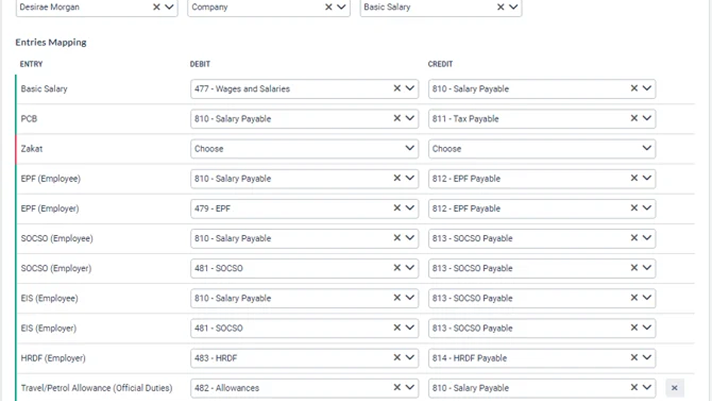
Customisable GL Mapping
Customisable GL Mapping
Map your payroll elements — salaries, EPF, SOCSO, claims, and bonuses — to the exact Xero account codes that match your accounting structure.

Real-Time Financial Visibility

Real-Time Financial Visibility
Finance leaders get up-to-date views of payroll costs, tax deductions, and employee pay across departments — without waiting for month-end reports.

Statutory Compliance, Built In

Statutory Compliance, Built In
brioHR calculates EPF, SOCSO, EIS (Malaysia) and CPF (Singapore) automatically. All statutory values are synced to the right Xero accounts with zero manual work.
Secure, Auditable Data Trail

Secure, Auditable Data Trail
Every payroll sync is logged with a full audit trail. ISO 27001 certified infrastructure ensures your financial data is protected at every step.

Set Up in Minutes

Set Up in Minutes
Connect brioHR to Xero in a few simple steps. No IT team required. Our guided setup walks you through mapping and configuration from day one.
How to use the Xero x brioHR integration
Whether you're coming from Xero or already on brioHR, setup takes just a few minutes.
Access Integration Settings in brioHR
Log in to your brioHR account. Navigate to HR Settings → Payroll → "Xero" then in Settings, click "Connect to Xero".

Authorise with Your Xero Account
You'll be redirected to Xero's login page. Enter your credentials to authorise brioHR to access your Xero organisation securely.

Map Payroll Elements to GL Accounts
Map each payroll item (basic salary, EPF, SOCSO, EIS, PCB, expense codes) to the appropriate Xero account codes in your chart of accounts.

Run Payroll and Sync to Xero
After finalising your payroll run in brioHR, Manual Journal Entries automatically appear in Xero instantly. No manual work needed.


Find out more about How to Set Up Xero Integration in brioHR HERE
Their 100,000+ successes, our pride
We found brioHR to be very comprehensive and configurable to suit us. We couldn't be happier with how much easier it's made HR tasks!

Edward Widjonarko
CEO Cicil
What I loved most was how the module provided me with all the important details about the company, its culture, and policies. It helped me feel more integrated and confident in my role.

Natasha S
Legal Associate
What I like best about brioHR is how user-friendly and intuitive the system is. It makes handling payroll, leave, and employee data easy and efficient. The platform is complete with all the features we need, yet it’s not overwhelming to use. I also appreciate the responsive customer support team.

Verified user
Computer software
I like how user friendly and thoughtful it is, there were a lot of functions that can be utilised and will definitely help the management in terms of organizing the employees files and data.
Chrisaint N
Jr HR Executive
brioHR has been a game-changer for our HR processes. The system is intuitive, efficient, and covers everything from payroll to onboarding. The support team is responsive and always helpful. Highly recommend!
Brandon
Staff
Most HR software systems come with the basics like payroll, claims, and leave. But brioHR’s solution actually integrates into one user-friendly package.

Tho I-Wee
Executive Director
We found brioHR to be very comprehensive and configurable to suit us. We couldn't be happier with how much easier it's made HR tasks!
Edward Widjonarko
CEO Cicil
What I loved most was how the module provided me with all the important details about the company, its culture, and policies. It helped me feel more integrated and confident in my role.
Natasha S
Legal Associate
What I like best about brioHR is how user-friendly and intuitive the system is. It makes handling payroll, leave, and employee data easy and efficient. The platform is complete with all the features we need, yet it’s not overwhelming to use. I also appreciate the responsive customer support team.
Verified user
Computer software
I like how user friendly and thoughtful it is, there were a lot of functions that can be utilised and will definitely help the management in terms of organizing the employees files and data.
Chrisaint N
Jr HR Executive
brioHR has been a game-changer for our HR processes. The system is intuitive, efficient, and covers everything from payroll to onboarding. The support team is responsive and always helpful. Highly recommend!
Brandon
Staff
Most HR software systems come with the basics like payroll, claims, and leave. But brioHR’s solution actually integrates into one user-friendly package.
Tho I-Wee
Executive Director
It has been positive so far, a learning curve for both myself and brioHR. I am happy with the effort made to constantly adapt to the requirements of the client, which is never easy.
Lucy T
Human Resource & Talent Manager
brioHR has been one of the most user-friendly and affordable payroll systems I’ve worked with — I used it and recommended it even before becoming a partner, simply because it genuinely helped.

Fiona Tan
Founder, Heartworks
Most of the features are simple to use and easy to understand, and customer service is fast and helpful. Our Leave, Claims and Onboarding are all currently handled by brioHR. It’s automated and largely customisable.
Verified user
Insurance
Among the many payroll systems I’ve used, brioHR clearly offers the most intuitive and user-friendly experience

InaHas Lina
Staff
Good HR system. Easy to use with nice interface. Support team is responsive and very helpful with some tricky questions I had. Has all the features I need for my small business - payroll, leaves, claims etc
Idris A
Staff
It has been positive so far, a learning curve for both myself and brioHR. I am happy with the effort made to constantly adapt to the requirements of the client, which is never easy.
Lucy T
Human Resource & Talent Manager
brioHR has been one of the most user-friendly and affordable payroll systems I’ve worked with — I used it and recommended it even before becoming a partner, simply because it genuinely helped.
Fiona Tan
Founder, Heartworks
Most of the features are simple to use and easy to understand, and customer service is fast and helpful. Our Leave, Claims and Onboarding are all currently handled by brioHR. It’s automated and largely customisable.
Verified user
Insurance
Among the many payroll systems I’ve used, BrioHR clearly offers the most intuitive and user-friendly experience
InaHas Lina
Staff
Good HR system. Easy to use with nice interface. Support team is responsive and very helpful with some tricky questions I had. Has all the features I need for my small business - payroll, leaves, claims etc
Idris A
Staff
FAQs
brioHR is recognized as a leader

Ready to connect your HR and accounting?
Join thousands of businesses running payroll on brioHR and close the loop with Xero today.